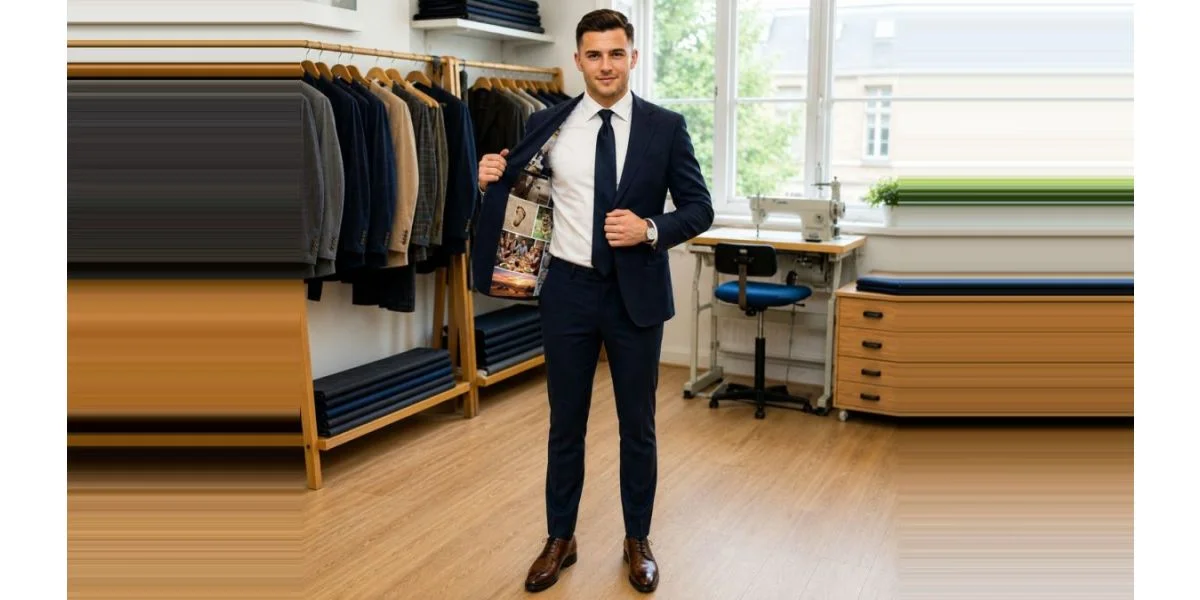
A personalized suit lining puts something meaningful inside the jacket where only you see it unless you open it: a family photo, a picture of someone who can't be at the wedding, or a short line of text such as your names and date. The best results come from one sharp, well-lit original photo with a clear subject, chosen and checked well before you order.
Our Custom Photo Lining Suit prints one photo per lining from a JPG or PNG file up to 6000 × 6000 pixels, with an optional text line of up to 40 characters. Below are lining ideas that work, then a checklist to make sure your photo prints well.
Photo lining ideas for grooms
Family and memory
- Your parents' or grandparents' wedding photo. A quiet nod to the marriages that came before yours. Old prints scan well if you use a flatbed scanner at high resolution.
- Someone who can't be there. A late parent or grandparent, or a relative who can't travel. It turns the lining into a quiet tribute you carry through the day.
- A childhood photo. You as a boy with your father, your brothers, or the friend who is now your best man.
The two of you
- The proposal moment. If someone caught it on camera, it makes a natural reveal for the photographer.
- Your first photo together. Even a slightly awkward early picture has charm, as long as the file is sharp enough.
- A place that matters. The spot where you met, your first apartment's front door, or the city skyline where you got engaged.
Lighter touches
- Your dog or cat. Pets photograph well on fabric because they make a strong single subject.
- A favorite team, car or hobby shot. Use your own photo; skip logos and images you don't have the right to use.
- A hand-drawn note or sketch. Photograph or scan your partner's handwriting or a child's drawing.
Combining several photos
Each lining carries one image. If you want several pictures, make a collage yourself first and upload it as a single file. Keep it to four to six photos at most; more than that and each face gets too small to recognize. Free phone apps and simple design tools can build a grid in a few minutes. Export the collage at the highest quality the app allows, as a JPG or PNG.
The photo checklist: will it print well?
Run through this list before you upload. Fabric is less forgiving than a phone screen, and a photo that looks fine at thumbnail size can look soft once printed across a jacket lining.
| Check | Good | Avoid |
|---|---|---|
| Source | The original file from your phone or camera, or a high-resolution scan of a print | Screenshots and images saved from social media or messaging apps, which are compressed |
| Resolution | As large as you have, up to 6000 × 6000 pixels; recent phone photos are usually around 3000–4000 pixels on the long side | Files under about 1,500 pixels on the long side |
| Sharpness | Faces in focus when you zoom to 100% | Motion blur, digital zoom, heavy filters |
| Light | Daylight or even indoor light, faces clearly visible | Dark party photos, strong backlight, heavy grain |
| Subject | One clear subject that fills a good part of the frame | Tiny figures in a wide landscape, crowded group shots |
| Crop | Subject centered with some space around it, so nothing important sits at the edge | Faces right at the border of the image |
| Format | JPG or PNG | HEIC, PDF or RAW files (convert them first) |
| Permission | Photos you took or own, with the people in them happy to be included | Professional photos without the photographer's permission, celebrity or brand images |
Two quick tests help. First, zoom into the photo on a computer screen until faces fill the screen; if they look smeared, find a better file. Second, view it in black and white; if the subject still stands out, the image has enough contrast to read on fabric.
Ideas for the 40-character text line
The optional text line holds up to 40 characters, which is about one short line. Count spaces. Some ideas that fit:
- Names and date: "Sam and Alex, 06.14.2027"
- A place and date: "Asheville, June 14, 2027"
- A dedication: "For Dad, always with us"
- An inside phrase only the two of you understand
- Map coordinates of where you met, shortened to fit
Avoid song lyrics and quotes you'd need permission to reproduce, and double-check spelling and date format before ordering, because the text is printed exactly as typed.
Choosing the suit around the lining
The photo lining suit is styled as pictured and made in your standard size or your own measurements, in 2–3 weeks or 7–10 days with a rush order. If you'd rather design the outside of the suit yourself, choose fabric, lapels and pockets with Design Your Own Suit. For help picking the color, see our groom's guide to wedding suit colors, and leave time for the order; our wedding suit timeline suggests ordering about 12 weeks out. Fit is covered by our fit promise, though as a personalized garment the suit can't be returned for a change of mind.
Questions
Can I put more than one photo in the lining?
Each lining takes one uploaded image. To include several, combine them into a single collage before uploading.
What resolution does a suit lining photo need?
Use the largest original you have. The upload accepts files up to 6000 × 6000 pixels; an original photo from a recent phone is normally fine, while screenshots and social media downloads usually are not.
Do groomsmen get photo linings too?
They can each order a photo lining suit with their own photo. It can double as a thank-you gift, with a picture of the group together.